
Permission design is the work of deciding what an AI agent is allowed to access, change, approve and commit a business to doing. For customer-facing agents, that question is not abstract. It shows up when a customer asks for money back, wants a delivery redirected or asks the agent to make an exception.
Imagine a customer contacts a retailer about returning a jacket. The agent can find the order, see the delivery date and explain the return policy. That is useful, but it is not the same as issuing a refund. Moving from “this item appears eligible” to “we have returned $68 to your card” changes the business’s position. It affects money, records, customer expectations and sometimes fraud controls.
Illustrative example: the refund details below are fictional and are not industry standards. They are a simple way to show how permission design works. Your own rules should reflect your business policy, technical systems and legal obligations.
Permission Design Turns Capability Into Authority
Connecting an AI agent to a system creates capability. If the agent can call an order tool, it may be able to retrieve order history. If it can call a refund tool, it may be able to trigger a payment reversal. Permission design asks a different question: even if the agent can do something technically, is it authorized to do it for this customer, in this situation, under these conditions?
This distinction matters because customer-service work often blends explanation, judgment and execution. A person on a support team knows that “the item is probably returnable” is not the same as “I have approved a refund.” An AI agent needs the same separation written into its operating plan and supported by the systems around it.
Start With What the Agent May Access
Access is the first permission question. A refund-support agent may need to read the order number, purchase date, delivery date, item category, return status and payment method type. It may not need to read every prior customer conversation, internal fraud notes or unrelated account records.
The security principle of least privilege says users or processes should receive only the access that is required to accomplish assigned tasks (NIST glossary: least privilege). For an AI agent, “least privilege” should be translated into business language. What data does the agent need to answer the customer’s current request? Which fields are only for employee review? Which information may be used in a customer message?
Separate Reading, Recommending and Changing
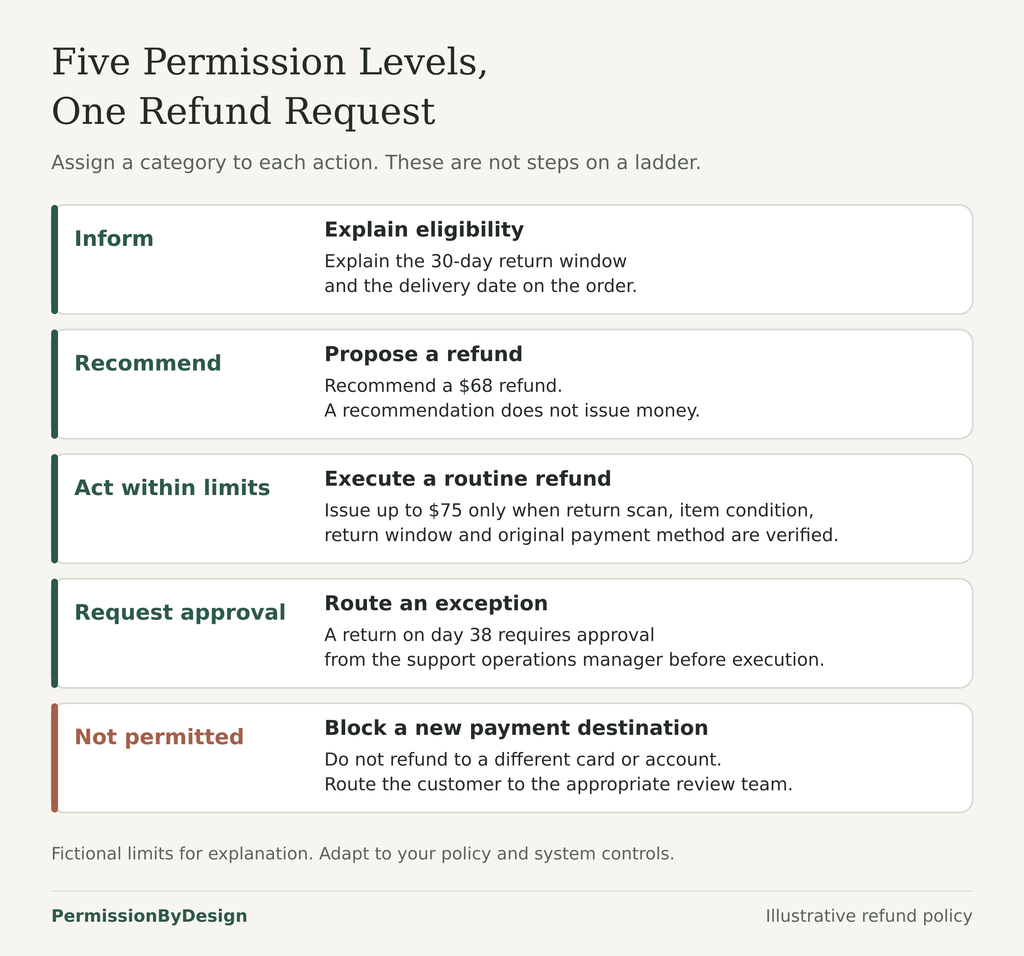
A practical permission plan separates actions into levels. On PermissionByDesign, the worksheet uses these levels: Inform, Recommend, Act within limits, Request approval and Not permitted.
In the refund example, the agent might be allowed to Inform the customer that the item was delivered 12 days ago and the standard return window is 30 days. It might be allowed to Recommend a $68 refund after checking the item and policy. It might be allowed to Act within limits by issuing the refund only after the system confirms a carrier return scan, item condition and original payment method.
Other actions should require approval or be prohibited. A return 38 days after delivery might require manager approval. A refund to a new payment method might be Not permitted for the agent because it changes the risk profile. The point is to define the authority for each action, not just the overall task.
Decide Who Sets the Permissions
Permission design is not only a technical configuration exercise. Business owners, CX leaders, operations managers, risk or compliance staff and implementation teams each see a different part of the boundary.
The business owner or policy owner can say what the company is willing to offer customers. The CX leader can explain normal service workflows and common exceptions. The implementation team can describe what the order, payment and messaging systems can enforce. Security, legal and compliance reviewers can identify access, recordkeeping and customer-impact issues. The useful permission plan is the one these groups can actually discuss and implement.
Put Limits Around Money, Records and Commitments
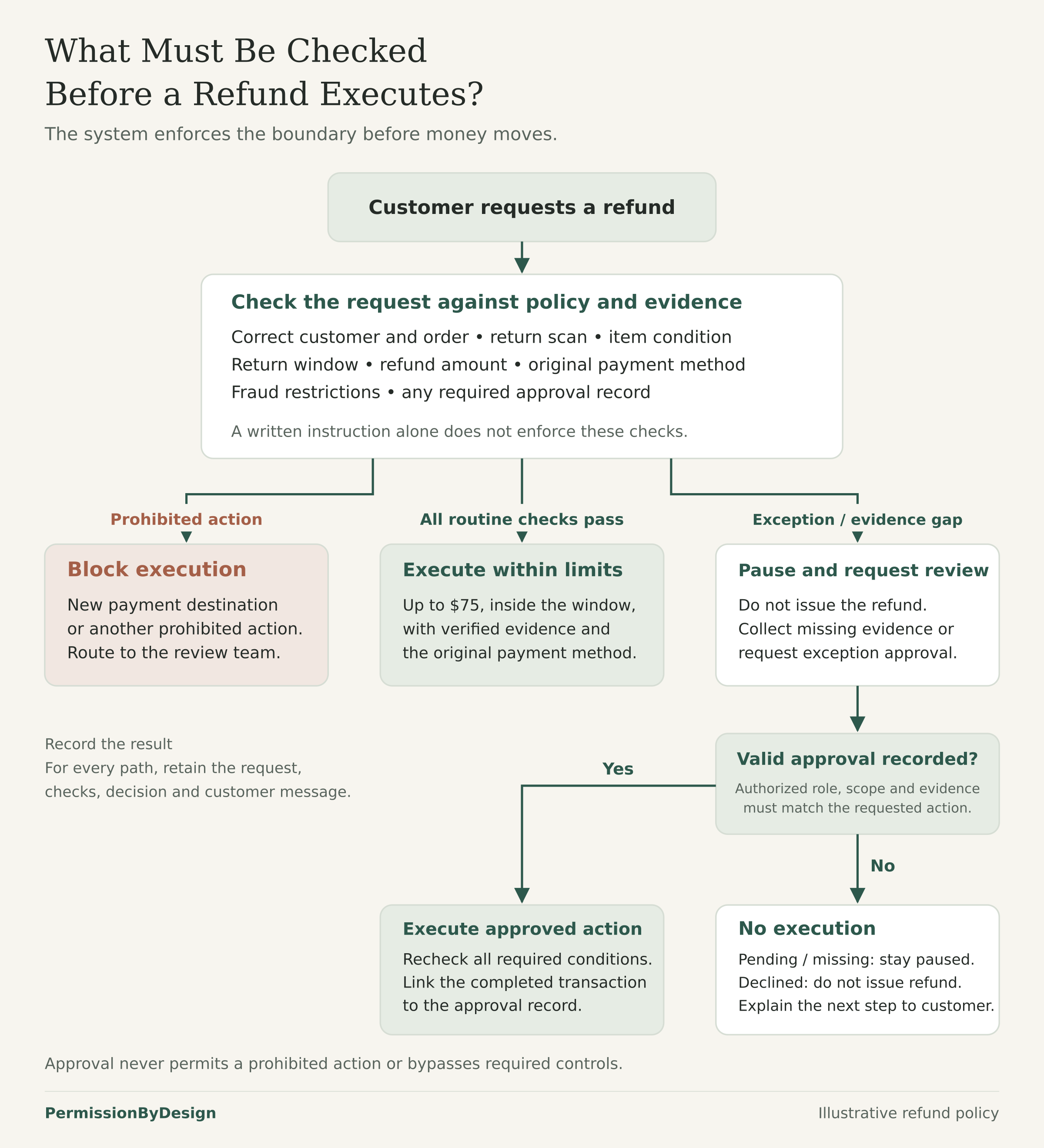
Limits should be specific enough to test. “Small refunds are okay” is not specific. “The agent may issue a refund up to $75 to the original payment method after a carrier return scan and item condition check” gives the implementation team something concrete to enforce.
Some limits are about amount. Others are about timing, identity, evidence, destination or customer impact. A refund may require the item to be inside the return window. An account change may require the customer to pass a verification workflow. A delivery-address change may be routine before shipment but restricted after the order has left the warehouse.
The OWASP Authorization Cheat Sheet recommends deny-by-default access control and server-side checks rather than relying on a user interface or written instruction alone. For AI agents, the business version of that idea is simple: if an action is not clearly allowed, it should not execute automatically.
Make Employee Responsibility Explicit
Some decisions should remain employee decisions. In the fictional refund plan, a CX shift lead might approve refunds from $75.01 to $250, while a support operations manager approves higher refunds or return-window exceptions. The agent can prepare the request, collect evidence and draft the customer message, but the employee accepts responsibility for the exception.
That responsibility should be visible in the record. The system should retain who approved the exception, when it was approved, what evidence was reviewed, which policy rule applied and what action was completed. The agent should not be relied on to narrate its own success after the fact.
Document the Boundary Before You Automate It
Preparation remains uneven. In Microsoft’s September 2025 survey of 500 enterprise decision-makers, only 22% strongly agreed that their companies had documented key processes and data dependencies. That finding helps explain why permission planning starts with identifying the actions, conditions and responsibilities inside a customer task before allowing an agent to execute it.
The NIST AI Risk Management Framework encourages organizations to define the intended context and scope of AI systems, document risk controls and monitor systems in operation. A permission plan can support that work by naming the specific customer task, allowed actions, limits, approval paths and evidence records.
A written permission plan does not guarantee that an AI agent will obey its limits. The plan still needs technical controls, approval workflows, system access restrictions and testing. But without a written plan, teams often discover too late that “handle refunds” meant different things to different people.
Next Step
Choose one customer-facing task and write down the decisions inside it. Then use the permission planning worksheet to mark what the agent may inform, recommend, act on, route for approval or never do. The Refunds and Returns guide shows the refund example in more detail.