
The hardest permission question is not whether an AI agent can help. It is whether the agent may complete an action on its own. A helpful support agent can explain policies, gather information and draft next steps. Only some actions should be completed without another checkpoint.
This article gives business owners and CX leaders a practical way to assign authority to each action in a customer-facing workflow. The examples are fictional and illustrative, not recommended limits for every business.
List the Actions Before You Assign Authority
Begin with one customer task. “Change an order” is still too broad. Break it into actions: read the order, explain available options, update the shipping address, change the delivery date, cancel an item, charge a card, issue a refund and send a confirmation message.
Each action can receive a different authority level. An agent might independently explain a shipping policy but need customer confirmation before changing an address. It might recommend a refund but need employee approval before issuing it. It might be prohibited from changing payment destination at all.
The permission planning worksheet uses five labels: Inform, Recommend, Act within limits, Request approval and Not permitted. Those labels work best when applied action by action.
Use Independent Action for Low-Risk, Well-Defined Steps
An agent can usually do more on its own when the action is narrow, reversible and supported by reliable system evidence. For example, an agent might independently resend a receipt to the verified email address on the account. It might update a marketing preference from weekly emails to monthly emails. It might explain whether an order is inside the standard return window.
Independent action becomes more appropriate when the business rule is clear and the system can enforce it. “If the customer is authenticated, the email address matches the account and the message contains only the receipt for this order, resend the receipt” is a tighter permission than “help with receipts.”
OWASP’s authorization guidance recommends least privilege and deny-by-default access control. In business terms, the agent should not receive general authority when a narrow tool or condition-specific permission would do.
Require Customer Confirmation When the Customer Is Making the Choice
Some actions should not happen until the customer confirms the choice. Confirmation is useful when the agent is about to commit the customer to a visible outcome: changing a delivery address, applying store credit, selecting a replacement item, canceling an order or accepting a return label.
Customer confirmation should be specific. “Do you want me to update the delivery address to 14 Oak Street for order 10244?” is better than “Should I take care of that?” The confirmation should name the action, the important details and any consequence the customer should understand.
Customer confirmation is not the same as employee approval. If a customer asks for a refund outside policy, the customer can confirm that they want the exception, but the business still has to approve whether the exception is allowed.
Require Employee Approval When the Business Is Taking on Risk
Employee approval is appropriate when an action commits the business beyond routine limits. Refund exceptions, goodwill credits, manual account ownership changes, fraud-flag overrides and unusual purchase changes often belong here.
In the Refunds and Returns example, the fictional agent may issue a routine refund only after a return scan and condition check, up to $75, to the original payment method. Refunds from $75.01 to $250 require a CX shift lead. Higher refunds or policy-window exceptions require a support operations manager.
The agent can still do useful work before approval. It can summarize the customer’s request, gather order evidence, identify the policy rule and draft a recommended response. What it cannot do is execute the restricted action before the approval record exists.
Do Not Rely on Dollar Limits Alone
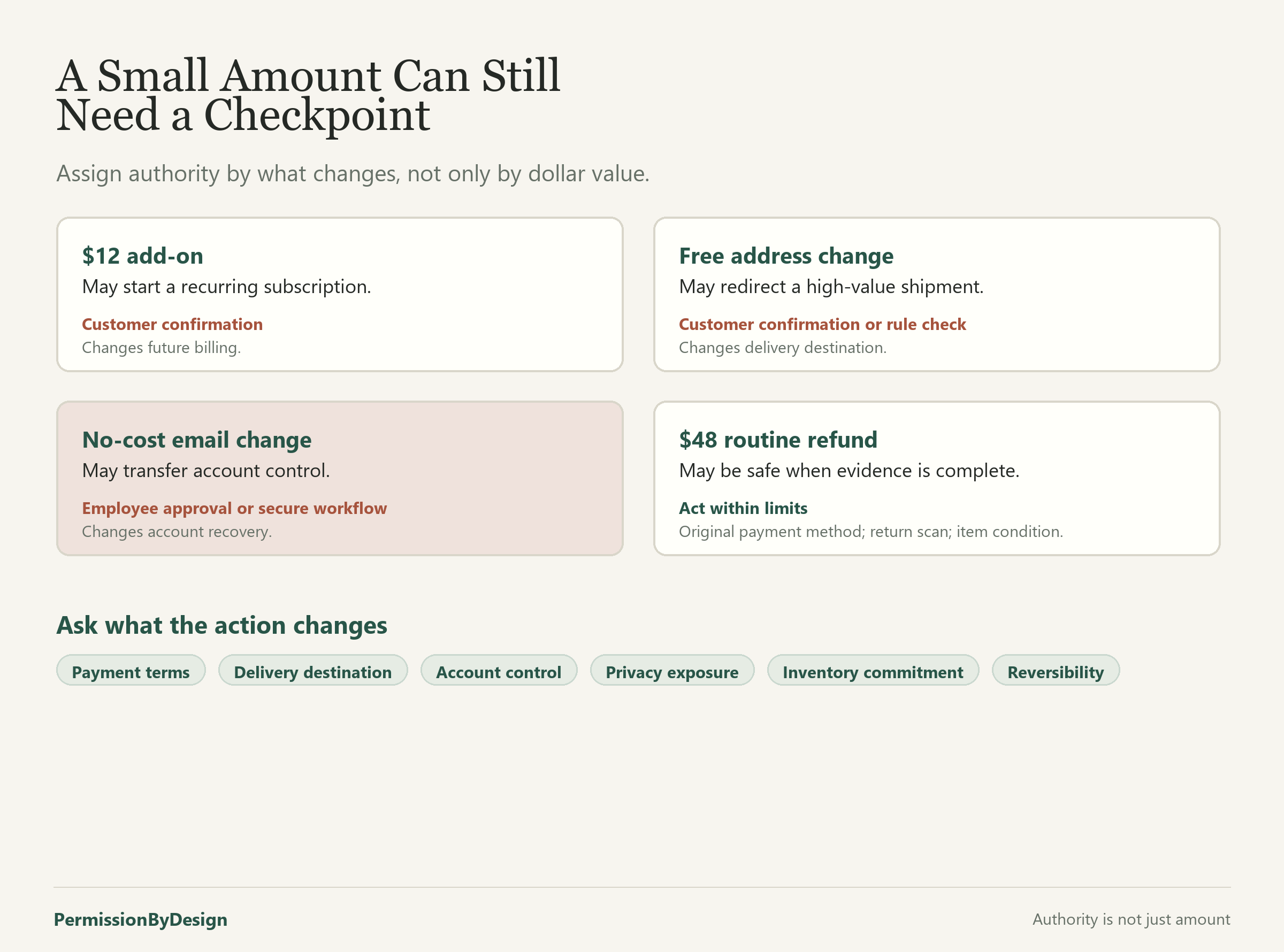
A dollar limit is helpful, but it is not enough. A $12 add-on could create a recurring subscription. A free address change could redirect a $900 shipment. A small refund to a new payment method could create fraud or accounting problems. A no-cost account email change could transfer control of future orders.
When deciding what the agent can do on its own, ask what the action changes, not only how much it costs. Does it change ownership, payment destination, delivery destination, contract terms, renewal status, privacy exposure, inventory commitment or a record the business relies on later?
A modest purchase may be routine if it is a one-time accessory shipped to the verified address. The same amount may require confirmation or approval if it starts a subscription, adds a warranty, changes billing frequency or affects a regulated product. The permission plan should capture those differences.
Check Whether the Action Is Easy to Reverse
Reversibility should influence authority. A display preference can usually be changed back. A shipped order, canceled appointment, disclosed account detail or refunded payment may be harder to undo. Even when an action can be reversed technically, the customer impact may remain.
For actions that are hard to reverse, add a checkpoint. That checkpoint might be customer confirmation, employee approval or a system rule that pauses the action until a required condition is met. The more difficult the recovery, the stronger the checkpoint should be.
Make the Authority Enforceable
A written instruction is not enough if the system gives the agent broad execution power. The safer design is to narrow the tools themselves. A refund tool can block amounts above a limit unless an approved exception ID is present. An address-change tool can refuse changes after shipment. A message tool can exclude internal-only fields from customer-facing responses.
NIST’s AI Risk Management Framework describes the importance of defining system context, internal controls, measurement and monitoring. For permission planning, that means turning “the agent should be careful” into concrete restrictions, tests and records.
A Simple Assignment Test
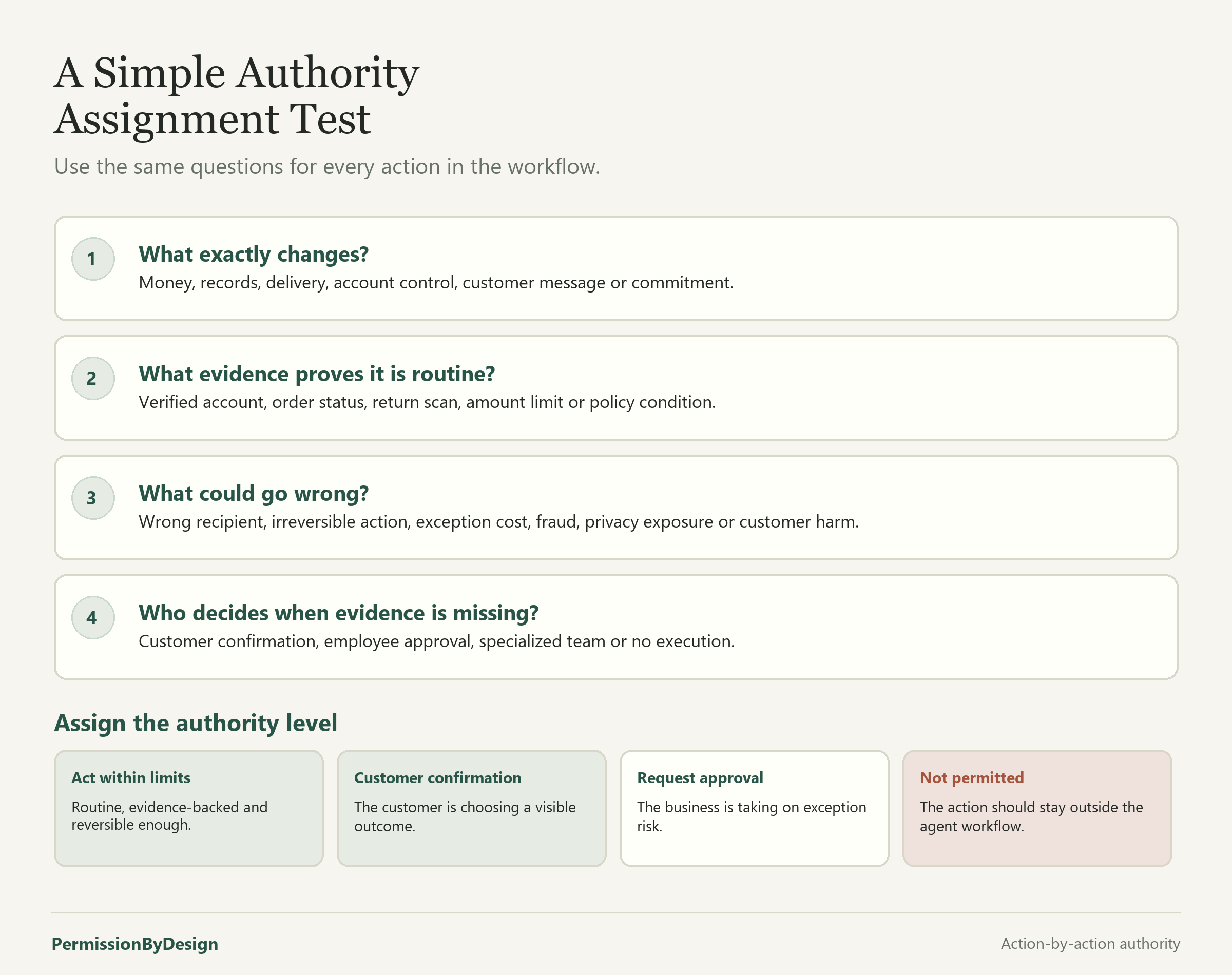
For each action, answer four questions. What exactly changes? What evidence proves the action is routine? What could go wrong if the action is wrong? Who should decide when the evidence is missing or the request is outside policy?
If the action is narrow, reversible and well supported by evidence, it may be a candidate for Act within limits. If the customer is choosing among options, require customer confirmation. If the business is taking on exception risk, use Request approval. If the action should remain outside the agent workflow, mark it Not permitted.
Closing Thought
The goal is not to prevent an AI agent from being useful. It is to give the agent enough authority to handle routine work while keeping customer commitments, payment actions and exceptions under deliberate control. Use the blank worksheet to assign authority one action at a time, then compare your draft with the completed refund example.
2 responses to “How to Decide What Your AI Agent Can Do on Its Own”
[…] permission planning worksheet, the guide to building a complete permission plan and the guide to assigning agent authority to turn that register into working limits. A written register does not guarantee enforcement, […]
[…] or uncertain action should pause. The guide to building a complete permission plan, the guide to agent authority and the completed refunds and returns example can help decide whether retries belong under Act […]