
AI agent permissions need owners for the same reason return policies, payment tools and customer records need owners: someone has to decide what is allowed, someone has to make the system enforce it, and someone has to notice when the answer changes.
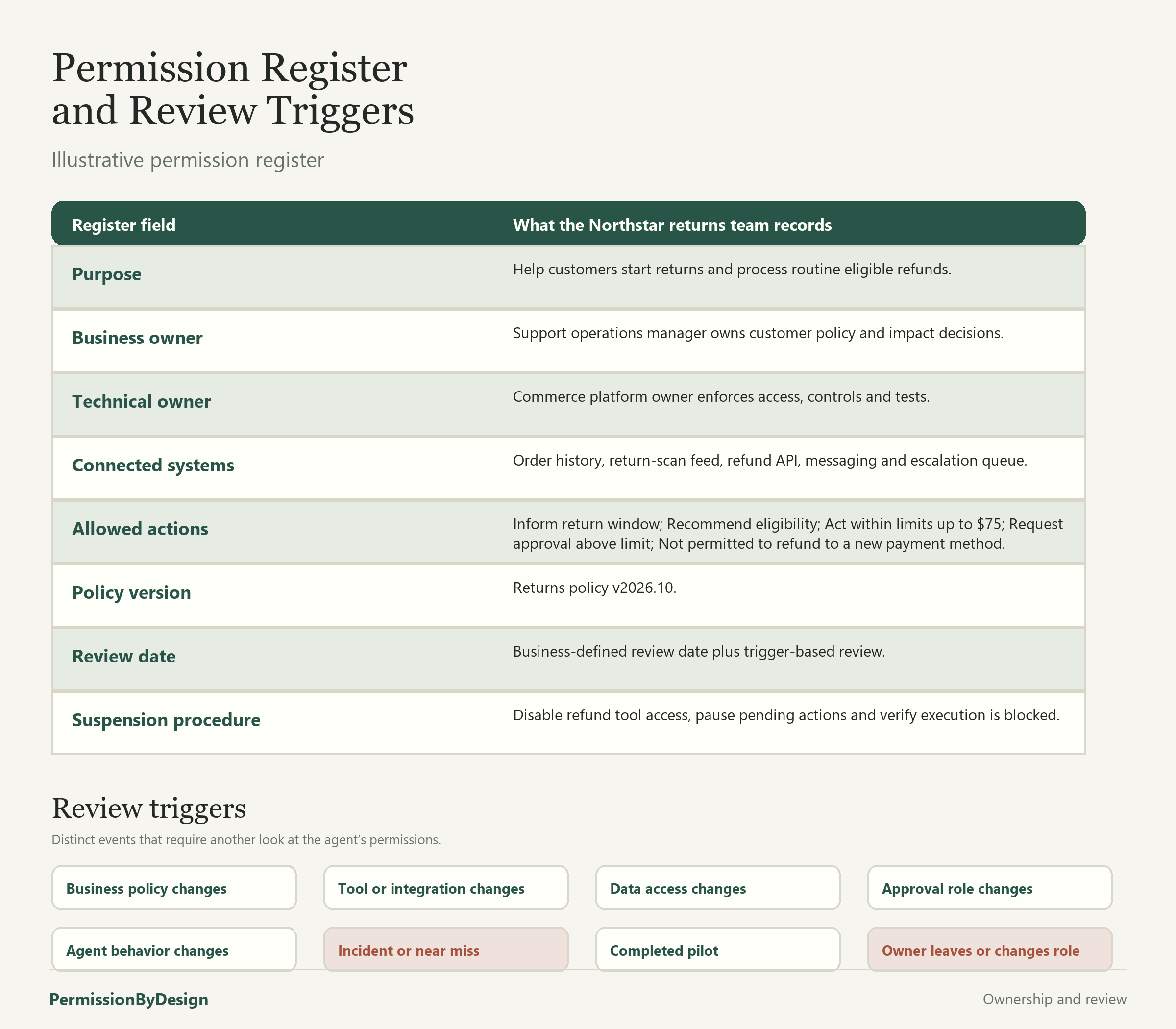
A permission plan should not be a one-time launch document. It should name who owns the business decision, who owns the technical enforcement, which systems are connected and when the plan must be reviewed. This article uses a fictional Northstar returns agent to show how permissions can become stale and how a team can correct them without assuming that edited instructions are the same as revoked access.
Illustrative example: Northstar, the returns agent, the goodwill-refund tool and the review process are fictional. They are not presented as industry standards or legal guidance. They are a practical model for completing the permission planning worksheet and reading the completed refunds and returns example.
Assign a Business Owner and a Technical Owner
The business owner decides what the agent is allowed to do for customers. In the Northstar returns workflow, that person is the support operations manager. They understand refund limits, return windows, exception handling and the promises the company is willing to make.
The technical owner makes sure the connected systems match those decisions. That work may include tool access, workflow rules, approval checks, logging and tests that prove the agent cannot execute actions outside the plan. OWASP’s authorization guidance emphasizes server-side access control and deny-by-default decisions, which is useful framing here: written permission should be backed by system enforcement, not treated as enforcement by itself.
A permission plan can also name supporting reviewers. Security may review access to customer data. Finance may review refund tooling. Legal or compliance may review customer communications and record retention. But the plan still needs clear owners, because shared concern without named responsibility is easy to lose during a busy launch.
Record Connected Systems and Allowed Actions
A customer-facing agent’s authority is shaped by its connected systems. A returns agent might read orders, inspect return scans, create return labels, issue refunds, send customer messages and open escalation tickets. Each connection should be listed separately because each one creates different authority and different risk.
Use the site’s permission levels consistently: Inform, Recommend, Act within limits, Request approval and Not permitted. The same customer task may contain several levels. The agent may Inform the customer about the return window, Recommend a refund after checking evidence, Act within limits for routine refunds and Request approval for exceptions. It may be Not permitted to refund to a new payment destination.
The permission register does not have to be complicated. It should be specific enough that business, CX and implementation teams can see what is currently allowed.
Decide When Permissions Must Be Reviewed
A calendar review is useful, but a calendar alone is not enough. Permissions should also be reviewed when something changes that could alter what the agent is able or authorized to do. NIST’s AI Risk Management Framework describes governance, mapping, measurement and management as ongoing risk-management functions rather than a one-time launch step. Permission reviews are one practical way to keep that work close to the customer-service workflow.
Events that should trigger another review include:
- Business policy changes: refund limits, return windows, fees, eligibility rules or exception paths change.
- Tool changes: a new refund tool, messaging tool, fraud tool or CRM workflow is added, removed or replaced.
- Data-access changes: the agent receives new fields, loses fields or can combine information in a new way.
- Approval-role changes: a shift lead, operations manager or specialist team changes responsibility.
- Agent-behavior changes: prompts, tools, routing logic or model behavior are updated in a way that affects recommendations or execution.
- Incidents or near misses: the agent tries to execute a prohibited action, misses required evidence or routes approval incorrectly.
- Completed pilots: a temporary pilot becomes permanent, expands to more customers or ends.
- Owner changes: a business owner or technical owner leaves, changes roles or no longer owns the connected system.
Worked Example: The Discontinued Goodwill-Refund Tool
Suppose a retailer once gave its returns agent access to a goodwill-refund tool. During a pilot, the tool let the agent request small courtesy credits for late deliveries and minor inconvenience. Later, the business discontinues that tool. The new policy says goodwill refunds must be handled by the support operations manager after review.
The written agent instructions are updated, but the technical owner discovers that the old goodwill-refund API credential still exists. The agent is no longer supposed to use the tool, but the system may still allow it to execute. That is a stale permission.
The team should not treat this as a copyediting problem. Removing a line from the instructions does not revoke system access. The safer response is to suspend the action, remove the credential or tool permission, check whether any goodwill-refund actions are pending, and verify that the tool can no longer execute from the agent workflow.
A practical cleanup sequence might look like this:
- Discover: identify that the agent still has access to the discontinued goodwill-refund tool.
- Suspend: pause any agent action that could use the tool while the review is open.
- Remove access: revoke the agent’s tool credential, workflow permission or API route.
- Check pending actions: look for queued goodwill refunds, drafted customer messages or approval requests that relied on the old authority. Restoring a paused configuration is not the same as restoring permission; any restored access must satisfy current policy.
- Verify denial: test that the agent can no longer execute the discontinued tool, including through retry paths or older workflows.
- Update records: record the date, owner, policy version, technical change and any customer cases affected.
OWASP’s logging guidance recommends recording security-relevant events in enough detail to support monitoring and investigation, while avoiding unnecessary sensitive data in logs. In the returns example, the useful record is not a transcript of every customer sentence. It is the permission change, tool access change, affected queue and verification result.
Keep Customer Confirmation Distinct From Employee Approval
A customer can confirm what they are asking for: “Yes, I want to return this jacket,” or “Yes, that is the correct address.” That is not the same as employee approval. Employee approval means an authorized person accepts responsibility for an action that exceeds routine authority.
If the goodwill-refund tool is discontinued, customer confirmation cannot bring it back. If evidence is missing, approval does not automatically resolve the missing evidence. If an action is Not permitted, approval should not quietly turn it into an allowed action. A prohibited action requires a deliberate policy change by the right owners and a system update that enforces the new rule before any restored access is available.
Set Review Dates and Retirement Procedures
Every permission register should include a next review date and a suspension or retirement procedure. Review dates help catch permissions that are still technically available after the business has moved on. Retirement procedures help the team act quickly when a tool, policy or owner changes.
For a returns agent, retirement might mean disabling the refund execution tool while leaving Inform and Recommend actions available. Or it might mean pausing all return actions until a new owner is assigned. The important point is that the retirement path is written before the team needs it.
Build the Register Before Permissions Drift
Permission ownership is ordinary operational hygiene. Name the business owner, name the technical owner, list the connected systems, document the allowed actions and choose the events that force another review. Then use the permission planning worksheet, the guide to building a complete permission plan and the guide to assigning agent authority to turn that register into working limits. A written register does not guarantee enforcement, security or compliance. It gives the business and implementation teams a concrete boundary to implement, test and revisit.
Use the Permission Plan Builder to turn these decisions into a working plan.
Ownership reviews should also look at evidence from the agent’s actual activity. How to Check Whether Your AI Agent Followed Its Permission Plan explains how to compare recorded actions, approvals and outcomes with the permission plan that applied at the time.